
Google has been rapidly improving its AI assistants. Gemini vs Google Assistant which is best? In this article, you can choose which one will work for you and when. Google Assistant launched on Android phones and smart speakers in 2016. It helps with tasks like checking the weather and setting timers.
In 2023, Google will release an assistant called Gemini that uses a new advanced language model. Built with this advanced language understanding and reasoning, Gemini can speak and solve problems more naturally and flexibly than Google Assistant.
Gemini is based on Google’s previous Bird chatbot. It is a chat-based AI that can answer questions and manage conversations. It is also able to manage your shared photos and files.
With the “Gemini Live” feature, you can get answers to a variety of questions and think. You can share a file, photo, or video and get real-time feedback. For example, you can share a picture of some vegetables or cooking ingredients and ask Gemini for ideas for different recipes using those ingredients. Alternatively, you can upload a document and ask Gemini to explain it.
Gemini can generate text, images, and short videos, similar to emails or stories, based on your narration. It is linked to your Google account. For example, you can ask it to write a short resume from your resume in Drive. In short, Google Gemini can handle all the complex tasks and find solutions to problematic tasks that go beyond simple voice commands.
What is Google Assistant?
Google Assistant is a voice-controlled helper available on Android phones, Google Home and Nest speakers, smart displays, and more. It was launched on Pixel phones and Google Home speakers in 2016. It is specifically designed to help you with your daily tasks.
You can wake it up by saying “Hey Google” (or “OK Google“) and it can answer questions (“What’s the weather like? Who won last night’s game?“), control apps (“Play jazz on Spotify,” “Send a text to Alexa“), and manage devices (“Set a timer for 5 minutes,” “Turn on the living room lights“).
Over the years, the Google Assistant has added numerous new features. Now, it’s appearing in smartwatches, cars, and more. It’s basically a voice-first assistant for simple tasks.
What is Google Gemini?
Google Gemini is Google’s new AI assistant. It is smarter and more helpful than the old Google Assistant. Gemini can answer complex questions, provide clearer answers, and work well with Google’s apps. This assistant is designed to feel more natural, creative, and useful during conversations and tasks in everyday life.
Google’s new AI model is smarter and more flexible than Google Assistant. It can understand complex questions and provide clear answers. You can ask it to “Summarize an article” or “Help me to draft an email“. Gemini can also translate text, create study notes, plan your day with Google Calendar, compare products, or brainstorm ideas. With its ability to go beyond simple commands, it makes technology feel more intuitive and human-like.
Learn more: Top AI Cloud Business Management Platform Tools in 2025
Key Features and Capabilities:
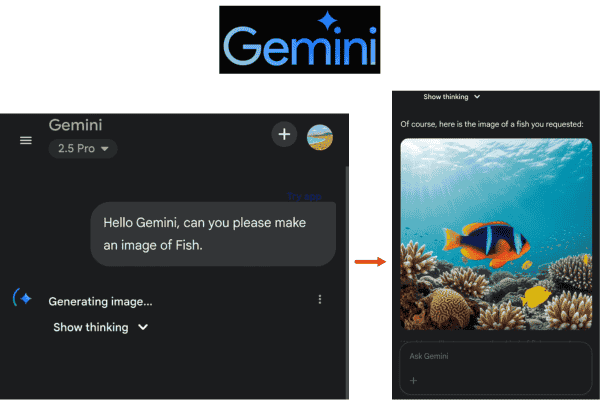
Gemini utilizes an advanced language model, such as Gemini 2.5 Pro, which can solve problems before providing an answer. This helps Gemini handle complex questions and multi-step tasks. For example:
Conversational Brainstorming:
You can easily chat with Gemini and change the subject whenever you want. It remembers the entire conversation and maintains it even if you change the subject. It helps you plan events or study through ongoing discussions.
Generative Tasks:
Gemini can create new content. It can help you write an article or code, allowing you to create a draft that you can improve. It has different modes, which will enable you to adjust your inputs. Gemini Pro features a large context window that can accommodate up to 1 million tokens, equivalent to approximately 1,500 pages of text. It is capable of handling long documents at once.
Document and Data Analysis:
When you upload a file or image to Google Gemini, Gemini can read and interpret a long report, slide deck, or textbook page in seconds, analyze the content of a spreadsheet, or highlight important parts of a photo you took.
Multimodal Creativity:
Gemini can create images or short videos based on your prompts. It uses Google’s Imagen technology to quickly create visuals like logo designs or fantasy landscapes. It can also create 8-second videos based on narration. Google Assistant can’t create this type of content.
In contrast, Google Assistant’s features are more task-focused and immediate:
Routine Actions:
Google Assistant helps you with your daily tasks like setting alarms, timers, and setting reminders (like, “Remind me to take medicine at 8 p.m.“). It also helps you send messages to someone (like, “Text Jack, meet me in the Salt Lake Cafe“) or play music. It works well with Android devices, so you can say, “Send an email to my boss“, and it will open or write to your email.
Quick Voice Queries:
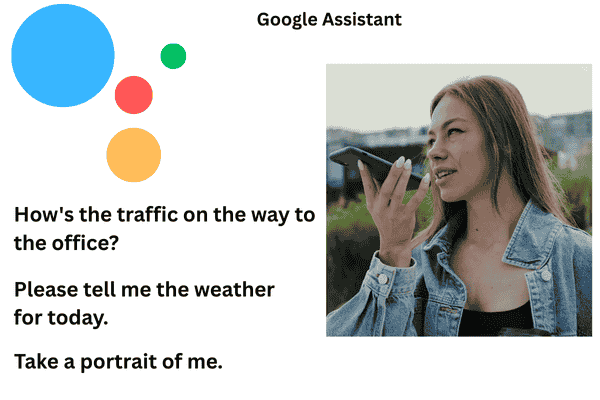
The Google Assistant can answer simple questions instantly. For example, if you ask “What is 49×56?” or “How’s the traffic on the way to the office?“, it will pop up Google Search or answer within a second or two.
Smart Home Control:
The Google Assistant works with hundreds of brands of smart devices, such as locks, lights, thermostats, and cameras. You can easily control the devices using your voice. For example, you can say, “Hey Google, turn off the lights” or “Take a portrait of me,” and it will do the job for you. Android Central explains that the Assistant is especially useful for tasks like turning off the lights, adjusting the thermostat, or turning on your induction cooker just by talking.
Ecosystem Integration:
This Assistant works with Google services like Maps, Calendar, YouTube, and Gmail. For example, you can say, “Show me my calendar for tomorrow.” It can also connect to other services, like for rides or food orders. However, Google is moving toward deeper integration with “App Actions” for these services.
Learn more: ARTIFICIAL INTELLIGENCE (AI) – A Beginner-Friendly Guide
Summary
Gemini is like an advanced AI assistant, powerful at conversation, content creation, and research. On the other hand, Google Assistant is like a fast command-and-control assistant – quick to answer questions and perform routine tasks.
Performance: Speed, Accuracy, and Understanding
The design of the Google Gemini and the Google Assistant is different, which helps them work best in different ways in their respective fields. Google Assistant is fast and reliable. It is designed to respond quickly, so when you ask it a simple question, you get an answer almost immediately. This quick response makes it easy to use in everyday life.
Google Gemini focuses on providing detailed answers. It can take longer to respond because it uses a large AI model, which can be slow for simple questions. However, this depth often results in more explanatory answers. Google notes that you can interact with Gemini in natural language, like talking to a personal assistant.
There’s also a change in accuracy. For simple questions, the Google Assistant usually gives the right answer. Gemini discusses more topics, but it can provide incorrect information. Google acknowledges that “Gemini may not always get the information right” and recommends using the double-check feature or verifying with a Google search. For important information, it’s important to double-check before accepting Gemini’s answer.
If you need quick and reliable answers, Google Assistant may be the best choice for you. But if you want more detailed answers and problem-solving information, Gemini may be the best choice. One source noted that Assistant is better for “fast, reliable task management,” while Gemini offers “advanced, detailed, and thoughtful” answers.
Practical Use Cases :
It helps to think of real scenarios:
Daily Quick Tasks (Google Assistant):
Want to quickly check the weather or sports scores, or check traffic on your way home? Google Assistant can help. You can also use it for smart home controls, like saying “Hey Google, lock the front door” or “Hey Google, turn off the lights.” For simple tasks like “How tall is Burj Khalifa?” or “Call Mom,” Assistant is great.
Creative or Complex Tasks (Google Gemini):
Let’s say you’re planning a trip or writing a report. You can ask Gemini to “help me plan a family budget for next year.” Gemini can ask questions to help with the planning. If you have a long report on rivers, you can tell Gemini to “summarize this document” to get to the main points without spending hours on it. Gemini can explain difficult concepts. Students can use it to learn new things. For example, “summarize the agenda for my next meeting” can answer these questions. Gemini can easily accomplish all the tasks mentioned above.
How They Work: Technical Differences
Google Assistant works differently from other voice assistants. It uses Google’s expertise in voice and search technology. When you speak, it recognizes your voice and responds using your device, gathering information from Google Search. For example, when you ask about the weather, Assistant retrieves that data from Google’s Knowledge Graph.
DeepMind’s large language models power Google Gemini. By 2025, Google will offer Gemini models, such as 2.5 Pro and Flash, which are large neural networks trained on a wide range of text and code. They use “chain-of-thought reasoning” to improve the accuracy of complex questions. Since they run on Google’s cloud, they can be slower due to lower processing times.
Gemini can do things that Assistant can’t, like creating text or images. Google Assistant, on the other hand, handles light tasks through simple cloud searches on the device. In simple terms, Assistant has a variety of scripts and services for quick tasks, while Gemini is like ChatGPT – an advanced model.
Strengths and Limitations
Gemini Strengths & Limitations
This tool can answer almost any question you have. It is especially effective for carrying on a conversation or understanding details. It is capable of handling different types of input, such as text, images, voice, or documents.

In terms of limitations, Gemini can be slow for new and simple tasks. It’s mainly available in the Gemini app and Google’s services, and not yet on all devices. If at any point it can’t get your job done, you’ll have to use Google Assistant. Some of its special features, like the Pro model and its long history, require a paid subscription.
Assistant Strengths & Limitations
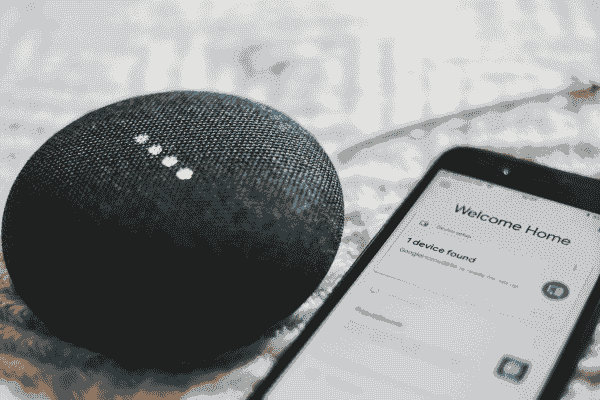
This technology is everywhere and easily accessible on billions of devices like phones, speakers, watches, TVs, and cars. It understands voice commands and quick queries accurately. It is great for smart homes. You can use it for free, with no subscription or easy setup.
This tool is not creative. It can’t write essays, analyze documents, or have meaningful conversations. It can’t do sophisticated tasks like creating images or videos. It can basically do simple verbal tasks like giving you traffic directions, giving you term reports, etc.
When to Use Gemini vs Google Assistant
You can definitely turn to Google Assistant as a fast, free assistant for everyday tasks like getting instant answers, setting alarms, or controlling smart home devices. If you have a Google-enabled device, Assistant is a reliable choice.
Gemini is a helpful tool for work, study, or creative projects. It saves time by understanding context and creating useful content. Gemini can also summarize emails and calendar events for personalized answers. Writers, researchers, and students can benefit from its better answers and ideas. If you use Google Workspace (like Gmail, Docs, and Sheets), it can boost your productivity even more. To access all the features, especially the Pro model and deep search, you need a Google AI Premium subscription.
Most people use these two tools. Assistant for quick and easy tasks and Gemini for heavy tasks. You can use both tools depending on your needs.
Verdict: Which Assistant Fits Your Needs?
Both Google Assistant and Google Gemini have their place. For most casual users, Google Assistant is enough. It’s fast, reliable, and hassle-free for home control. It requires no additional setup or cost, and millions of people use it every day to help them with their daily tasks.
Google Gemini is for users looking for advanced AI features. Gemini is for more advanced help with writing and learning. Google may combine these assistants in the future, but for now, choose based on your needs and how much AI you want to rely on.
Stay tuned for more easy-to-follow content that makes Artificial Intelligence simple to learn and apply. Our goal is to break down complex ideas into clear, engaging insights you can actually use.